Orange Button in the UK
Fire stopping software for UK projects.
Find every service penetration and builders work opening in the model, check the space around them, and register every penetration seal on site with photo and status. Orange Button gives UK fire stopping teams one fire stopping register, from the first clash to the handover report.
Kostenlos bis 200 Brandschutz-Clashes im Monat.
Fire stopping is under the spotlight.
Since the Building Safety Act, the focus on fire stopping and compartmentation has never been sharper. For higher-risk buildings, a Gateway 2 application has to show how fire stopping will be designed, inspected and recorded, and at Gateway 3 the as-built evidence is reviewed. That evidence is hard to rebuild afterwards: it has to be captured at the point of installation and kept in the golden thread.
Built for the way UK projects work
- Builders work in connection (BWIC)Clash against builders work openings, not just walls and floors. Every service through an opening is identified and analysed automatically, and an opening with two or more services becomes one multi-service penetration.How it works →
- Compartmentation checked before it is builtOpening size, construction, fire rating and the A, B and C distances are checked in the model for every compartment wall and floor. Penetrations that are too close together become a multi-service penetration, before the opening is formed.The framework →
- A fire stopping register for the golden threadEvery penetration seal is registered at the point of installation: location, tested system, photos and status. The handover report shows every seal in the building: evidence that can be part of the golden thread.The Field app →
- No Revit neededBIM Online runs in your browser with the IFC models from the design team. Fire stopping specialists can start without BIM software or BIM experience.BIM Online →
Video · BWIC openings
Builder’s work openings, linked to every firestop.
When the openings for services are in the model, BIM Online gives each clash its opening number and size, turns shared openings into MSPs and shows them in the Engineering wall views. One Clashlist tells the builder, the installer and the firestop specialist the same thing, and every opening stays traceable for the golden thread.
Watch the full BIM Online tour →From model to proof, in three steps
- OB BIMFind every penetrationImport the IFC models, check the data and find every penetration through fire-rated walls, floors and builders work openings.
- OB OfficeQuote and designQuantities per penetration, construction and fire rating for your quote, and one place to design and follow every project. Tested systems from your manufacturers are selected automatically as they join the platform.
- OB FieldRegister every sealInstallers see every penetration on the plan, install the tested solution and record photo and status, offline too.
Automatic selection of tested systems works with the manufacturers on the platform, and systems approved for the UK are being added. Until then, clash detection, engineering checks and site registration work on every UK project today. Tell us which manufacturers you work with, and we will get in touch with them.
Already used in the UK
UK end-users design and register their fire stopping with Orange Button today.
- End-userGolden Thread Fire Delay

A UK passive fire protection specialist since 1994, supporting clients with project management and the golden thread of information. Uses Orange Button for its BIM engineering.
Read the news → - End-userLDD Construction

London-based passive fire protection contractor, accredited by the ASFP and FIRAS: fire stopping with fully tested systems, structural fire protection, cavity barriers and fire doors, for clients such as Overbury, ISG and Mace.
Visit LDD Construction ↗ - EventThe Fire Safety Event, Birmingham
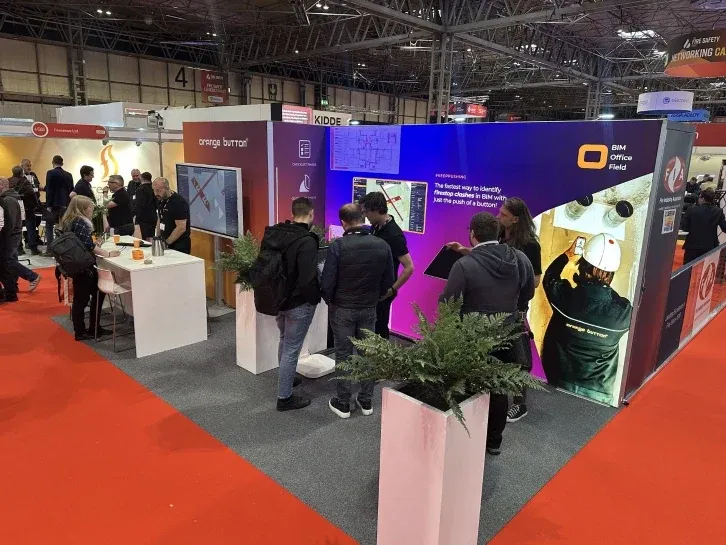
We showed the complete BIM to Field workflow live at our stand in Birmingham, including the new BIM Online.
Read the post →
For UK manufacturers
Be the first UK manufacturer on the platform.
UK end-users such as Golden Thread Fire Delay and LDD Construction already design and register their work with Orange Button. Put your tested systems into the model, and they are selected automatically wherever a penetration fits, without a competitor next to you yet.
- Your systems as BIM Solutions, selected automatically
- Installed as tested, registered on site with photo and status
- Usage data: see where your systems are designed and installed
Fragen
Does Orange Button support the golden thread?
Orange Button builds a digital record of every penetration seal: its location, the tested system, photos, status and the handover report. That record can be part of the golden thread of information for your building.
Can we use it for fire stopping surveys and remedial work in existing buildings?
Yes. Without a BIM model you upload PDF floor plans, and your team records every penetration on site, including existing seals, with photos and a status such as Damaged or Maintenance.
We work under a third-party certification scheme. Does it fit?
Yes. Whether you work under FIRAS, IFC Certification or the BM TRADA Q-Mark scheme, the Field app keeps the installation record per seal in one place: location, tested system, photos and status, with every change logged.
Does Orange Button help with Gateway 2 and Gateway 3?
It helps you show how fire stopping is designed before construction starts, and it builds the as-built record per seal during installation. It does not replace your fire strategy or the requirements of the Building Safety Regulator, but it gives you structured evidence instead of loose photos and spreadsheets.
Can Orange Button produce a fire stopping register?
Yes. Every service penetration is recorded with its location on the floor plan, the construction, the tested system, photos and its status, from New to Approved. The handover report lists every penetration seal in the building, ready for your client and the golden thread.
Can Orange Button clash against builders work openings?
Yes. Builders work openings (BWIC) in the model take part in clash detection. Every penetration through an opening is identified automatically and analysed against the tested systems, and an opening with two or more services becomes one multi-service penetration.
Are there tested systems approved for the UK?
Systems approved for the UK are being added to the platform. Clash detection, builders work openings, the A, B and C distance checks, quantities and site registration already work on every UK project. Tell us which manufacturers you work with, and we will get in touch with them.
Do I need Autodesk Revit?
No. BIM Online runs in your browser with IFC models. Teams that already model in Revit can use the Revit plugin with the OneClick apps.
In which currency are the prices?
Our prices are in euros, excluding VAT. You start free with 200 firestop clashes a month, no credit card needed.
See it on one of your UK projects.
Book a demo and we will run your own model through Orange Button, builders work openings included.