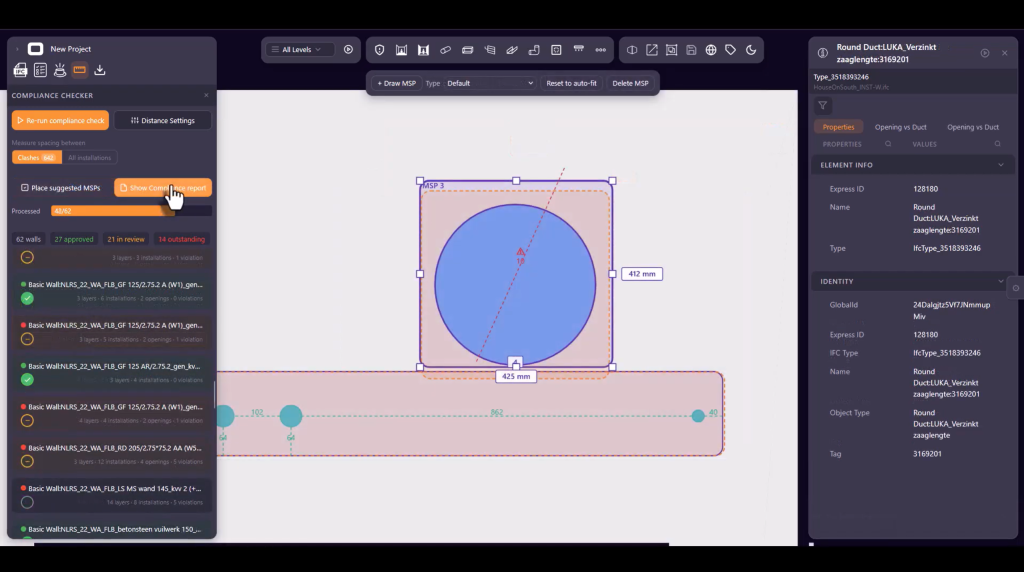
Ensuring fire safety compliance in construction projects requires precise distance checks between installations, openings, and Multi Service Penetrations. Manual verification is slow, error-prone, and costly. The OB Compliance Checker automates this process entirely — saving time, reducing risk, and keeping your projects compliant.

Why Fire Safety Compliance Checking in BIM Matters

Fire safety regulations require strict minimum distances between service elements, openings, and Multi Service Penetrations (MSPs) in any construction project. Getting these distances wrong doesn’t just create compliance issues — it can lead to failed inspections, costly rework, and serious safety risks.
For MEP engineers, BIM coordinators, and construction managers, manually verifying these distances across hundreds of penetrations in a large project is one of the most time-intensive tasks in the design and review process. That’s exactly the problem the OB Compliance Checker is built to solve.

What is the OB Compliance Checker?

The OB Compliance Checker is a new feature within Orange Button BIM web edition that automatically checks all distances between installations and openings across your entire project. It flags every violation, suggests solutions, and generates a professional compliance report — all within your existing BIM environment.

The tool is built around three internationally recognized distance categories used in firestop compliance:

A distances — the minimum required distance between service elements of specific types within a given construction category.

B distances — the minimum required distance from each service element to the edge of an opening or Multi Service Penetration.

C distances — the minimum required distance between element types within a single opening or MSP.

Customizable Settings for Every Firestop Solution

Because fire safety requirements vary by construction type, region, and firestop product, the OB Compliance Checker is fully configurable.

In the settings menu, you can define the maximum allowed dimensions for Multi Service Penetrations and specify which combinations of service elements are permitted within a single MSP. For each of the three distance categories — A, B, and C — you set your own minimum values per construction category and element type.

Since distance requirements often differ per firestop solution, you can create and save multiple custom distance tables under a specific name. This makes it easy to switch between configurations or apply the right settings for each project or client requirement.

How the Compliance Check Works

Running a compliance check is fast and flexible. You can check all clashes in your project or all service elements in one go. The OB Compliance Checker then identifies every distance violation and presents them for individual review.

For each violation, the tool suggests possible solutions based on your project context. You can accept a suggestion, modify it, or draw your own solution directly within the application. Every construction can be assigned a status — approved or under review — giving your team a clear picture of progress throughout the review process.

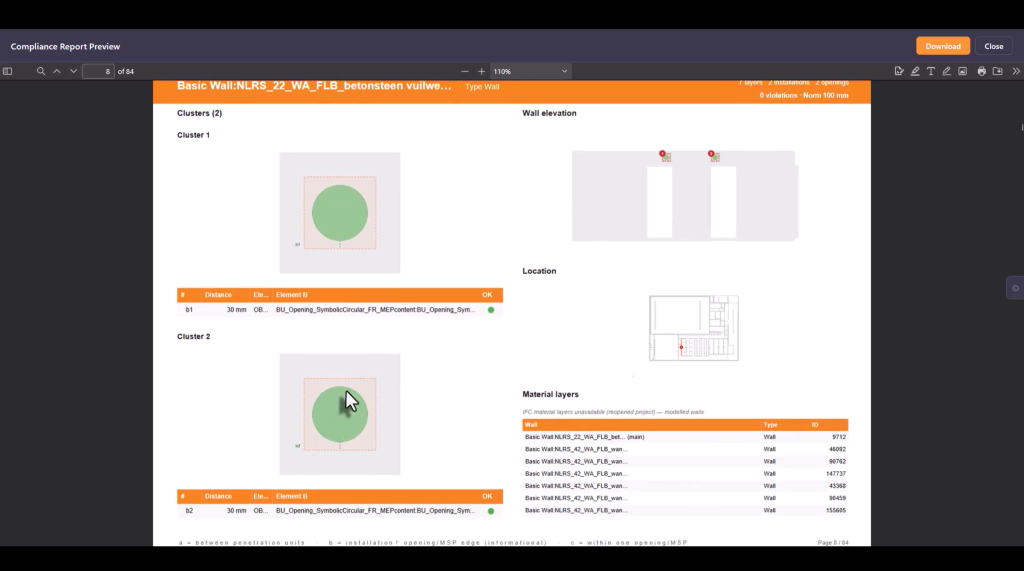
Once your compliance review is complete, you can export the results as a structured PDF report — ready to share with clients, contractors, or inspectors.

The report includes a clear overview per floor, a summary of all constructions containing violations, a detailed table of violations per construction, and cluster views showing violations and potential solutions within each individual construction.

This makes it easy to communicate compliance status to all project stakeholders, without requiring them to access the BIM model directly.

The OB Compliance Checker will be available in Orange Button BIM web edition within two weeks. Watch the preview video below to see the feature in action before the official release.

Frequently Asked Questions

What is a BIM compliance checker for fire safety?
A BIM compliance checker for fire safety is a software tool that automatically verifies whether installations, openings, and penetrations in a building model meet the minimum distance requirements defined by fire safety regulations and firestop product specifications.

What are A, B, and C distances in firestop compliance?
A distances refer to the minimum distance between service elements in a construction. B distances refer to the minimum distance from a service element to the edge of an opening or MSP. C distances refer to the minimum distance between elements within an opening or Multi Service Penetration.

What is a Multi Service Penetration (MSP) in construction?
A Multi Service Penetration is a single opening in a fire-rated construction through which multiple service elements — such as pipes, cables, or ducts — are routed together. MSPs must comply with specific size and composition rules to maintain the fire resistance of the construction.

Does the OB Compliance Checker support custom firestop solutions?
Yes. You can create and save your own distance tables per firestop solution, allowing you to apply the correct compliance settings for each specific product or project requirement.

Articles

Air Fire Tech joins Orange Button!

Exciting news, Air Fire Tech joins Orange Button! Air Fire Tech has decided to join Orange Button as a manufacturer! 🚀 Their slogan, “Fire protection without compromise,” says it all. They provide innovative, thoroughly tested solutions tailored to specific situations, with a strong focus on shaft wall prefabrication and CLT

Learn More »

Orange Button BIM- How does it work? 

How does Orange Button BIM work? Introducing Orange Button BIM for Firestop We’re excited to present a full series of video tutorials that guide you through everything you need to know about Orange Button BIM! These step-by-step videos cover it all—from registration to advanced features like clash detection. Step 1-

Learn More »

What BIM details are necessary to generate fire protection quotes?

What BIM Details Are Necessary To Generate Fire Protection Quotes? To automatically generate quotes for firestopping penetrations in fire-rated barriers, specific information must be integrated into the Building Information Modeling (BIM) system. Accurate data entry is crucial for precise cost estimation and project planning. Fire Resistance Requirements First, fire resistance

Learn More »

Headquarters

Leeuwenhoekstraat 48
2652 XL Berkel en Rodenrijs
The Netherlands