OneClick Numbering
OneClick Numbering- This app helps you process numbers for calculation elements, multiservice penetrations, remarks and firestop solutions.
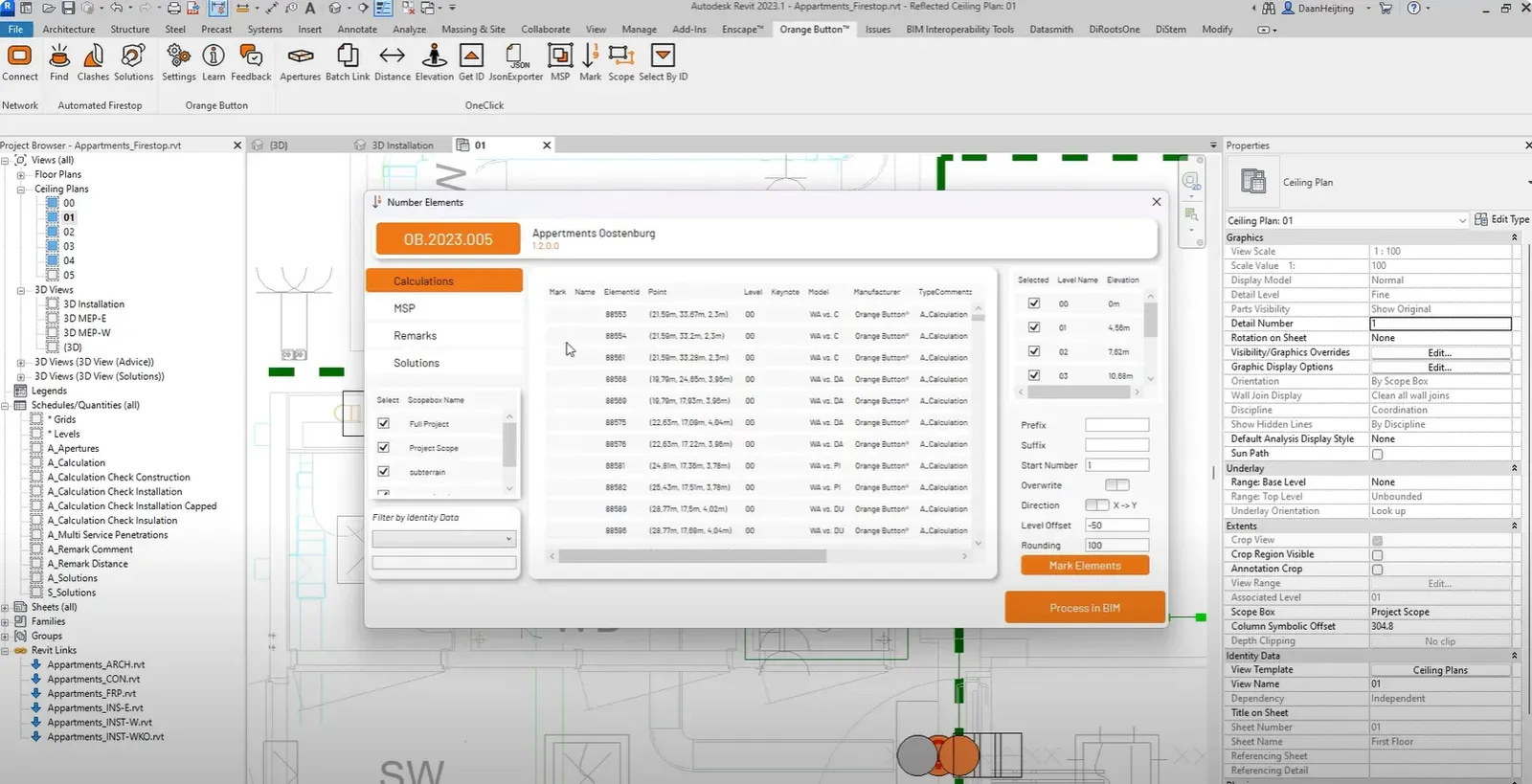
Orange Button has officially launched the Numbering OneClick app. This productivity tool is designed to mark every firestop component in your BIM.
Numbering your firestop components enhances the traceability of your activities throughout the design and construction phase. This app helps you process numbers for calculation elements, multiservice penetrations, remarks and firestop solutions. Not only that, it will also number the elements that are part of a multiservice penetration! Making it easier to work with multiple installations going through the same opening.
One Click Numbering
With some nice extra features as:
- Numbering per Scope Box in your project.
- Numbering per Level in your project.
- Adding a offset for numbering to your Levels.
- Adding a prefix or suffix.
- Overwrite existing numbers.
- Adding new numbers to existing numbers.
- Choosing between x- or y-direction for numbering.
- Rounding your direction for numbering to enhance readability.
Say goodbye to surprises on the building site and hello to proficient BIM engineering
Bekijk
Bijgewerkt 14 november 2024